Mxsquad: A Bold Display Font That Elevates Real Small Business Branding
It was 8 a.m. on a Tuesday—coffee in hand, label printer humming—and I was finalizing the new batch of lavender-vanilla soy candle jars for my local shop. The scent was calming. The wax? Perfect. But the label? It looked… polite. Friendly, even. Just not memorable. That’s when I swapped in Mxsquad.
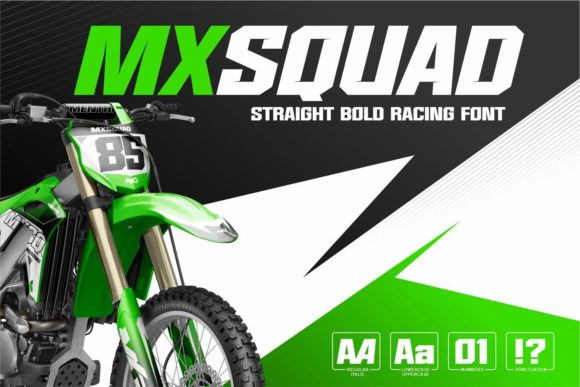
Within minutes, the same label felt sharper, bolder, and unmistakably mine. Not because the words changed—but because the typeface did. Mxsquad is a premium display font built for impact: thick, confident letterforms with sporty energy and clean geometry. It’s not delicate or whisper-quiet—it’s the kind of typeface that says “I’m here” without raising its voice.
Why This Font Works So Well on Real Product Labels and Packaging
Mxsquad thrives where attention is short and space is limited—like a 2-inch candle jar label, a bakery box stamp, or a boutique clothing tag. Its sturdy weight holds up beautifully at small sizes (down to ~10 pt on printed materials), and its open letter spacing prevents visual clutter—even on curved surfaces or textured kraft paper.
I tested it across three real use cases:
- Candle labels: Used Mxsquad for fragrance names (“Coastal Rain,” “Honey & Smoke”)—paired with a light sans serif for ingredients. Customers kept commenting on how “the name just *popped*.”
- Thank-you cards: Printed “Thanks for lighting up our day” in Mxsquad at 24 pt on matte cardstock. No extra design flourishes needed—the font carried the tone.
- Instagram story banners: Layered over product mockups, Mxsquad stayed legible even at thumbnail size—no squinting, no lost meaning.
That consistency—from physical label to digital story—is where Mxsquad quietly strengthens trust. When your packaging, website banner, and social graphics share the same bold, grounded voice, customers start recognizing you faster—not just by logo or color, but by how your words feel.
Where Mxsquad Shines (and Where to Use It Thoughtfully)
Mxsquad is a display font first and foremost. That means it’s designed for headlines, logos, short phrases, and visual accents—not long paragraphs or body text. Think of it like a great pair of statement earrings: powerful in the right context, overwhelming if overused.
Best uses include:
- Logo design (especially for lifestyle, fitness, food, or handmade brands)
- Product names and flavor variants on packaging
- Menu headers and café chalkboard-style signage
- Social media graphics—especially promotions, launches, and limited editions
- Stickers, tags, and retail shelf talkers
- Website hero banners and email subject lines
For readability on mobile screens or tiny stickers, stick to 3–5 words max per line. Avoid all-caps for longer phrases—Mxsquad’s strong character works best with natural capitalization (e.g., “Wild Mint Soap” instead of “WILD MINT SOAP”). And always test printouts: some inkjet printers soften edges slightly, so a quick physical proof saves time later.
Simple Pairings That Make Mxsquad Feel Even More Polished
You don’t need a design degree to pair Mxsquad well. In fact, its strength lies in how easily it plays with quieter fonts. Here’s what worked in real projects:
- With a clean sans serif (like Inter, Poppins, or Montserrat): Ideal for labels and menus—Mxsquad handles the headline (“Sea Salt Caramel”), while the sans serif delivers details (net weight, ingredients, origin story).
- With a subtle serif (like Lora or Playfair Display): Great for beauty or apothecary branding—adds elegance without competing. Try Mxsquad for the brand name, serif for the tagline.
- With a relaxed handwritten font: Perfect for artisanal food or craft businesses. Use Mxsquad for the product title, then a gentle script for “hand-poured,” “small-batch,” or “made in Portland.”
The key is contrast: Mxsquad brings weight and presence, so your pairing should bring clarity, warmth, or rhythm—not more volume.
What to Check Before You Install and Use It
Mxsquad comes as a commercial font, meaning it’s licensed for business use—including printed packaging, digital ads, client work, and merchandise. Before downloading or installing:
- Confirm it includes both OTF and TTF file formats (most do—great for compatibility across design apps and web platforms).
- Look for alternate characters or stylistic sets—some versions include rounded corners or tighter spacing options for fine-tuning.
- Check multilingual support if your audience includes Spanish, French, or other Latin-based languages (standard Mxsquad covers Western European languages well).
- Verify licensing allows use in digital templates you sell (e.g., Canva templates or Shopify themes)—most commercial licenses do, but always double-check the vendor’s terms.
No hidden surprises here: Mxsquad is straightforward to install, works in Adobe Creative Cloud, Figma, Canva (via upload), and most modern design tools. And because it’s a single-weight display font—not a full family—you’ll want to lean into its personality rather than trying to mimic hierarchy with bold/regular/light variants.
At the end of the day, typography isn’t about decoration. It’s about giving your business a voice that feels intentional, human, and unmistakably yours. Mxsquad doesn’t ask you to be louder—it helps you be clearer. Whether you’re printing 20 candle labels or launching your first Instagram ad, it’s the kind of design asset that makes professionalism feel effortless—not expensive, not complicated, just right.